
Send us your list. We’ll handle the gifts.
Use our easy-to-fill template or upload a spreadsheet you already have, like a funded loan report or CRM export. We’ll review your list, email you virtual proofs and a payment link, then handle the personalization, packaging, and shipping.
Want gifts to go out automatically? Explore our integrations →Closing gifts and every occasion after.
Keep closing gifts going out on a schedule, or send a single list for any occasion.
Recurring closing gifts
Upload your funded loan report each week or month, and we’ll send a closing gift to every borrower on the list.
Gifts for any occasion
Holiday gifts, past-client appreciation, referral partner thank-yous, company events, or anything else. Send one list and we’ll take it from there.
Your spreadsheet
Use your list or ours.
Upload your existing list or start with our template.
Already have a list? Send it as-is.
Your funded loan report, a CRM export, or any spreadsheet works. Upload it and we’ll pull out the details, then email your proofs and payment link. No reformatting needed.
Prefer a template?
Use our template to organize gift selections, shipping details, and personalization. Required columns are marked with an *.
Blank template
Includes instructions, example entries, and dropdowns for gift options and states.
 Download blank template
Completed example
See completed sample orders, with step-by-step instructions on the next tab.
 Download completed example
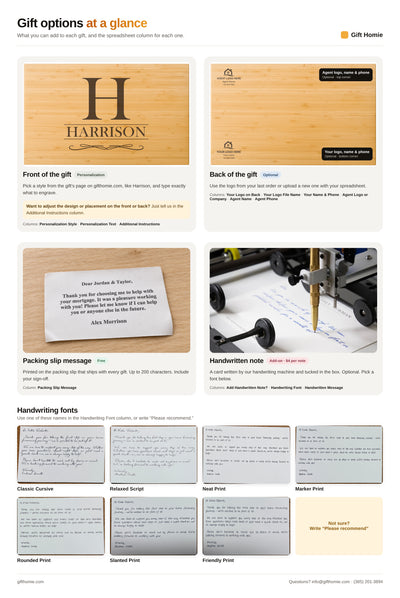
Gift options guide
Explore personalization options, logo placement, free packing slip messages, and $4 handwritten notes in seven font styles.
One row per gift. Sending someone two gifts? Add a second row.
Type personalization exactly as it should appear, including spelling, capitalization, and dates.
Not sure which design or font? Write “Please recommend” and we’ll suggest one.
Adding a logo? Upload the file with your spreadsheet and note its placement.
How it works
From spreadsheet to doorstep
You approve every gift before we make it. Nothing goes into production until your proofs are approved and payment is complete.
Upload your spreadsheet
Upload your existing list or a completed template (download it above ↑), along with any logo files.
We review it
We check every row and email you a virtual proof of each gift, plus a payment link.
Approve and pay
Once your proofs are approved and payment is made, your order goes into production.
Get tracking for every gift
Once your order ships, we’ll send you one sheet with tracking for every gift.
Common questions
When do I pay?
After we review your spreadsheet, we’ll email you a virtual proof of every gift and a payment link. Nothing goes into production until your proofs are approved and payment is complete.
What if my spreadsheet doesn’t include gift selections?
No problem! Upload your list and tell us what you’re looking for. You can browse our gift options and pricing, or ask us for recommendations. We’ll confirm your selections and total before anything goes into production.
Can each recipient get a different gift?
Yes. Each recipient can have a different gift, personalization, and message. Use one row per gift, including separate rows when sending someone multiple gifts. See the completed example.
What if I’m not sure which design or font to choose?
Write “Please recommend” in the design or font column, and we’ll suggest an option. You’ll see it on your proof before anything is made. Preview the fonts.
How long does it take to receive my gifts?
Turnaround times depend on the products, quantity, and personalization. Let us know your deadline when uploading your spreadsheet, and we’ll confirm timing before production begins.
Will my clients see what their gift cost?
No. We never include pricing on any gift we send. Packing slips and messages never show what the gift cost.
Ready to send your list?
Upload your list and any logo files. We’ll review everything and email your proofs and payment link.
Nothing is charged until you approve your proofs.


